Key Takeaways
- Qwen 3.6 27B is the new flagship pick: dense, Apache 2.0, 256K context, ~17 GB VRAM at Q4_K_M via `ollama run qwen3.6:27b` (released April 2026).
- Qwen3 8B runs in 5.5 GB of VRAM — one `ollama pull qwen2.5:7b` command and you're running at 57 tokens/sec on an RTX 3060.
- Four practical sub-families: Qwen3 (general, thinking-mode), Qwen2.5 (general, widest tested), Qwen2.5-Coder (coding, 92.7% HumanEval at 32B), Qwen2-VL (vision, best CJK OCR locally).
- Dense architecture = consumer-friendly: unlike DeepSeek's 236B MoE model (needs ~130 GB RAM), Qwen2.5-72B fits in 46 GB VRAM on two RTX 3090s.
- Native multilingual: pretrained on Chinese, Japanese, Korean, Arabic, German, French, and 23 more — Qwen3 consistently beats Llama 3.3 on CJK tasks.
- Q4_K_M is the right quantization for most users: ~55% VRAM reduction, less than 1% quality loss on benchmarks.
- Hardware decision: 12 GB VRAM → 14B model; 24 GB VRAM → 32B; 48 GB+ (two GPUs or Apple Silicon 64 GB) → 72B.
📍 In One Sentence
Qwen3 8B runs in 5.5 GB VRAM via Ollama; Qwen2.5-Coder 32B needs 24 GB and scores 92.7% on HumanEval.
💬 In Plain Terms
Qwen3 is a family of open-weight AI models from Alibaba that run on consumer GPUs — from a laptop GPU to a desktop RTX 4090 — without sending data to any cloud.
Which Qwen Sub-Family Should You Run?
The Qwen line-up now spans five practical picks: the Qwen 3.6 27B flagship, the newer Qwen3 family, Qwen2.5 general reasoning, Qwen2.5-Coder, and Qwen2-VL for vision — each with multiple size options. All are open-weight models published by Alibaba's Qwen team on Hugging Face under the Apache 2.0 licence.
Choose the sub-family first, then the size that fits your VRAM. Mixing sub-families is common: run Qwen2.5-Coder 14B for code completion and Qwen3 8B or Qwen 3.6 27B for document summarisation.
Sub-family | Sizes available | Primary use | Ollama tag prefix |
|---|---|---|---|
| Qwen3 | 0.6B, 1.7B, 4B, 8B, 14B, 32B | General reasoning, thinking-mode, multilingual, agentic tasks | qwen3: |
| Qwen2.5 | 7B, 14B, 32B, 72B | General reasoning, Chinese/multilingual tasks, RAG | qwen2.5: |
| Qwen2.5-Coder | 7B, 14B, 32B | Code generation, debugging, HumanEval, SWE-bench | qwen2.5-coder: |
| Qwen2-VL | 2B, 7B, 72B | Document OCR, image Q&A, CJK text extraction | qwen2-vl: |
Qwen 3.6 27B (released April 2026) is the new flagship pick — a dense model with a 256K context window that runs in ~17 GB of VRAM at Q4_K_M via `ollama run qwen3.6:27b`. Qwen2.5 remains the widest-tested family with the broadest Ollama and GGUF coverage as of mid-2026. See best local LLMs 2026 for a broader model comparison.
How Much VRAM Does Each Qwen3 Model Require?
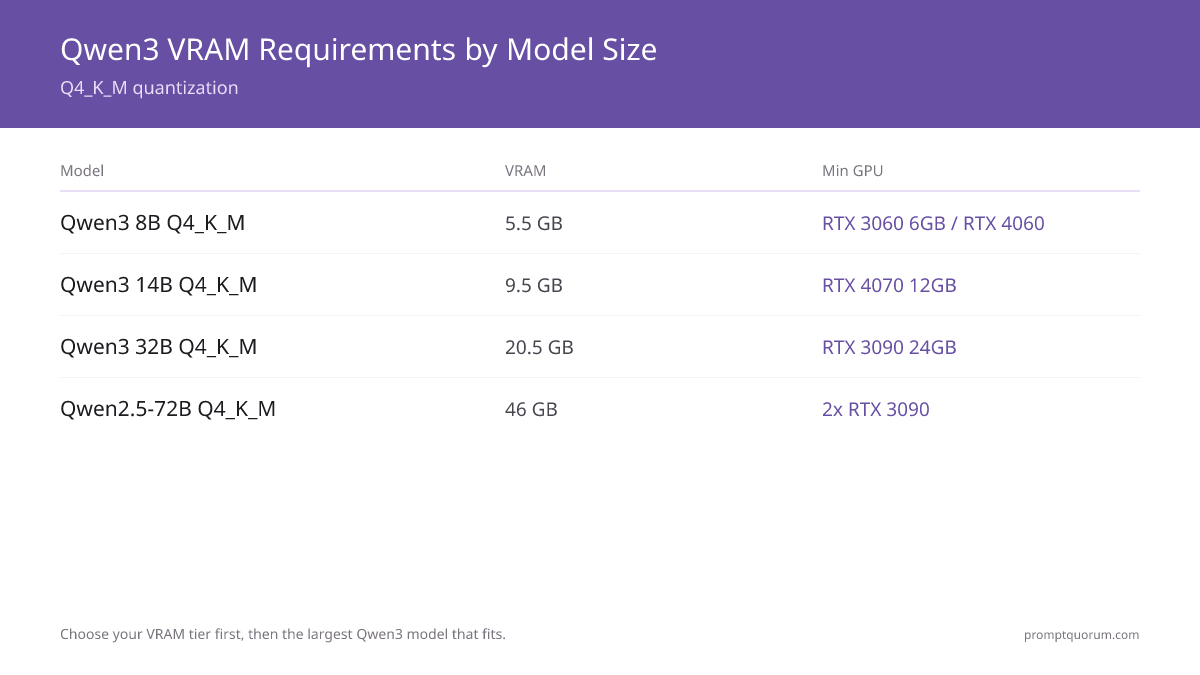
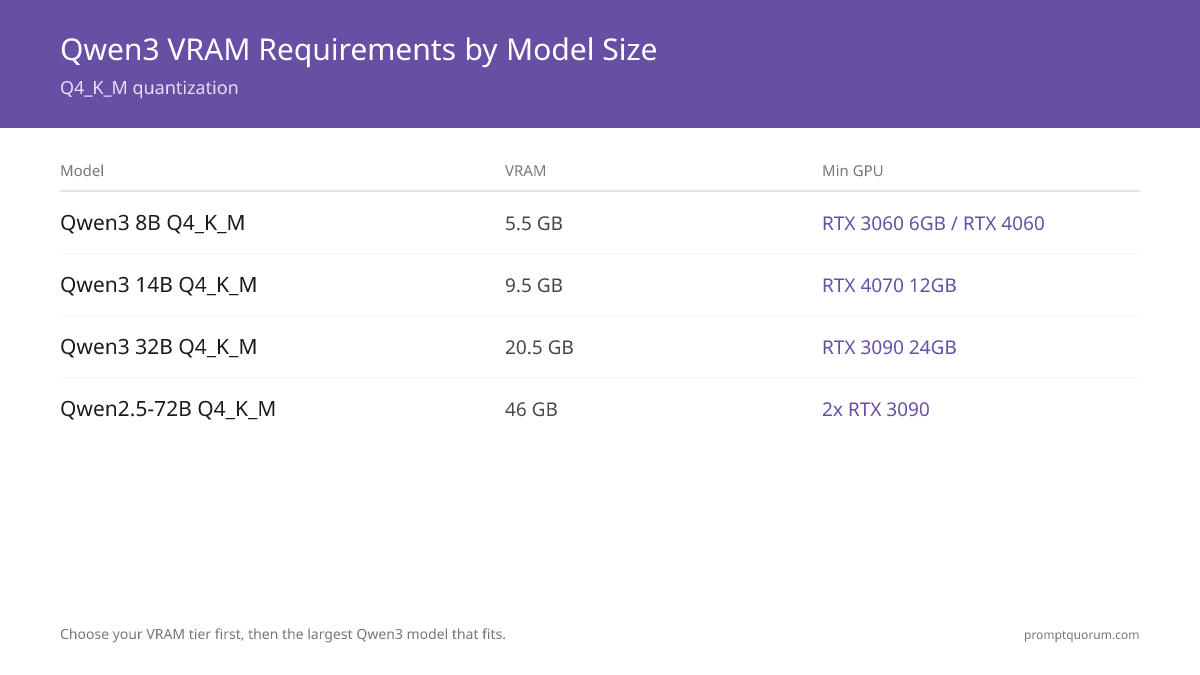
Pick your VRAM tier first, then select the largest Qwen3 model that fits. Q4_K_M is the standard quantisation used in all figures below — it gives the best size-to-quality ratio for Ollama and LM Studio.
Model | VRAM | Minimum GPU | Apple Silicon | Speed (RTX 3060) |
|---|---|---|---|---|
| Qwen3 8B Q4_K_M | 5.5 GB | RTX 3060 6 GB, RTX 4060 | M1/M2 8 GB | ~57 tok/s |
| Qwen2.5-Coder 7B Q4_K_M | 5.5 GB | RTX 3060 6 GB, RTX 4060 | M1/M2 8 GB | ~55 tok/s |
| Qwen2-VL 7B Q4_K_M | 6.2 GB | RTX 3060 8 GB, RTX 4060 | M1/M2 16 GB | — |
| Qwen3 14B Q4_K_M | 9.5 GB | RTX 4070 12 GB | M2 Pro 16 GB | — |
| Qwen2.5-Coder 14B Q4_K_M | 9.5 GB | RTX 4070 12 GB | M2 Pro 16 GB | — |
| Qwen3 32B Q4_K_M | 20.5 GB | RTX 3090 24 GB | M3 Max 48 GB | — |
| Qwen2.5-Coder 32B Q4_K_M | 20.5 GB | RTX 3090 24 GB | M3 Max 48 GB | — |
| Qwen 3.6 27B Q4_K_M | ~17 GB | RTX 4090 24 GB | M3 Max 36 GB | — |
| Qwen2.5-72B Q4_K_M | 46 GB | 2× RTX 3090 (48 GB) | M2 Ultra 64 GB | — |
VRAM figures are for Q4_K_M GGUF files from the Ollama library. Add 1–2 GB for the KV cache at 4K context. If your GPU has less VRAM than the model needs, Ollama automatically offloads layers to system RAM — this works but reduces speed significantly.
💡Tip: Found your VRAM tier? See exactly which GPU or Mac to buy for that tier — 6 GB → RTX 4060, 12 GB → RTX 4070 Super, 24 GB → RTX 3090/4090, 48 GB+ → Mac mini M5 Pro or dual GPU.
How Do You Run Qwen3 with Ollama?
Ollama is the fastest path to running any Qwen3 model locally — it handles model download, GGUF quantisation, and the local API at `localhost:11434` without any configuration. Install from ollama.com. If you have not used Ollama before, read how to install Ollama first.
- 1Install Ollama
Why it matters: Available for macOS, Linux (one-line install), and Windows. No GPU drivers to configure — Ollama detects CUDA, ROCm, and Metal automatically. - 2Pull the model with an explicit size tag
Why it matters: Always specify the size: `qwen2.5:7b`, `qwen2.5:14b`, `qwen2.5:32b`, or `qwen3.6:27b` for the flagship. The untagged `qwen2.5` resolves to the 7B model but may change between Ollama releases. - 3Run the model
Why it matters: `ollama run qwen2.5:7b` opens an interactive chat. Type your prompt and press Enter. Close with `/bye`. - 4Set context window if needed
Why it matters: Qwen3 supports 32K context by default in Ollama. To use 128K context on a 7B model, run `ollama run qwen2.5:7b --num-ctx 131072`. This requires more VRAM — add 2–4 GB for long contexts. - 5Test the API endpoint
Why it matters: Ollama exposes an OpenAI-compatible API. Applications like PromptQuorum, Continue.dev, and Open WebUI connect directly to `http://localhost:11434/v1`.
# Install Ollama (Linux)
curl -fsSL https://ollama.com/install.sh | sh

# macOS: download the .dmg from ollama.com or:
brew install ollama

# Pull models — use explicit tags
ollama pull qwen3.6:27b          # flagship, 256K context (~17 GB)
ollama pull qwen3:8b             # Qwen3 general 8B (~5.5 GB)
ollama pull qwen2.5:7b           # Qwen2.5 general 7B (~5.5 GB)
ollama pull qwen2.5:14b          # Qwen2.5 general 14B (~9.5 GB)
ollama pull qwen2.5:32b          # Qwen2.5 general 32B (~20.5 GB)
ollama pull qwen2.5-coder:32b    # Qwen2.5-Coder 32B (~20.5 GB)
ollama pull qwen2-vl:7b          # vision 7B (~6.2 GB)

# Run interactively
ollama run qwen2.5:7b

# Test the OpenAI-compatible API
curl http://localhost:11434/v1/chat/completions \
  -H "Content-Type: application/json" \
  -d '{"model":"qwen2.5:7b","messages":[{"role":"user","content":"Hello"}]}'
How Do You Run Qwen3 with LM Studio?
LM Studio provides a GUI interface for Qwen3 with no terminal commands. Download from lmstudio.ai, or see how to install LM Studio. It runs on macOS, Windows, and Linux.
- 1Open the model browser
Why it matters: Search "Qwen3" or "Qwen Coder" to browse all available GGUF builds. Filter by Q4_K_M for the recommended quality/size ratio. - 2Download a GGUF build
Why it matters: Select the Q4_K_M variant. LM Studio shows file size before download — confirm it matches the VRAM you have available. - 3Load the model and start chatting
Why it matters: Click the model in the left sidebar to load it into memory. GPU layer allocation is automatic based on detected VRAM. - 4Start the local server
Why it matters: "Start Server" exposes an OpenAI-compatible endpoint at `localhost:1234`. Your apps and scripts connect to it as if it were the OpenAI API.
Quantization: Which Format to Choose
Q4_K_M is the right default for Qwen3 on consumer hardware. It reduces VRAM by ~55–60% versus FP16 with less than 1% benchmark degradation on MMLU and HumanEval. Other formats have specific use cases:
📍 In One Sentence
Q4_K_M is the recommended default for Qwen3: 55% less VRAM than FP16, under 1% quality loss.
💬 In Plain Terms
Quantization is a compression technique — like reducing image quality to save file size. Q4_K_M keeps 99% of Qwen3's accuracy while cutting memory use in half.
- Q4_K_M (recommended): ~5.5 GB for 7B. Best quality-per-GB ratio. Use this first.
- Q8_0: ~8.5 GB for 7B. Near-FP16 quality; use if you have spare VRAM and want maximum accuracy.
- Q5_K_M: ~6.5 GB for 7B. Marginal improvement over Q4_K_M — only choose it if Q4_K_M output quality is visibly poor for your task.
- Q2_K: ~3 GB for 7B. Smallest file, but Chinese-language output quality degrades noticeably — avoid for Qwen3 if Chinese text is part of your use case.
- IQ4_XS: ~4.8 GB for 7B. A newer imatrix quantisation that beats Q4_K_M quality at slightly smaller size — available in recent llama.cpp releases and LM Studio 0.3+.
How Does Qwen3 Perform on Consumer Hardware?
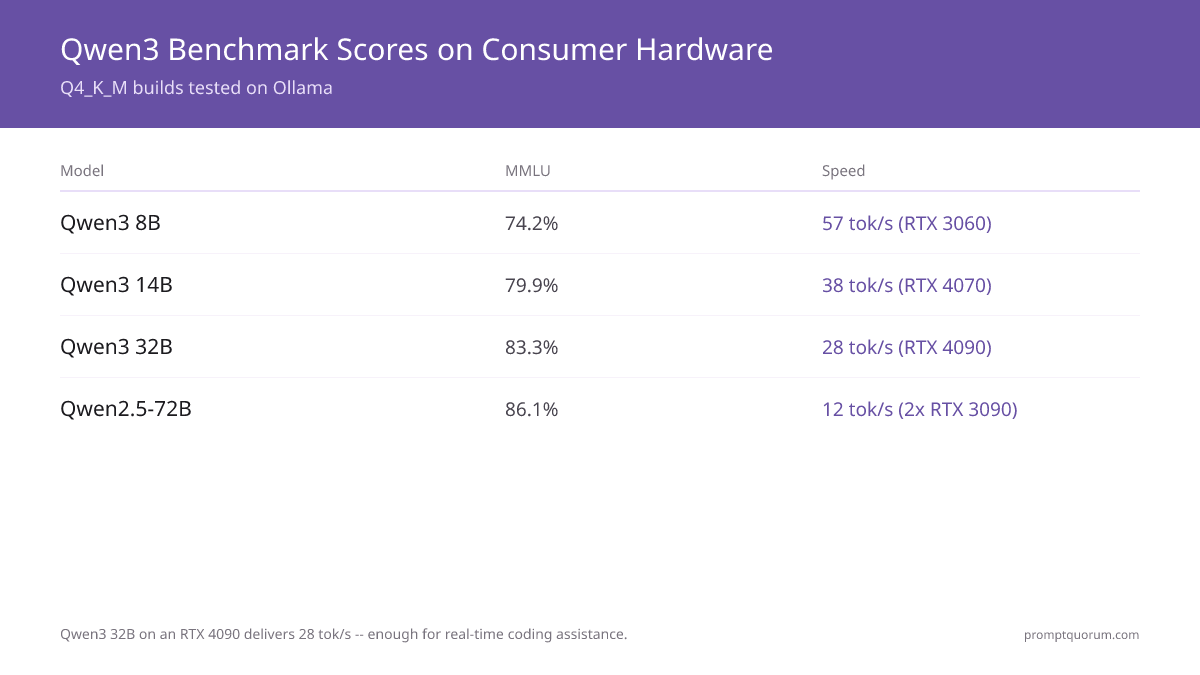
Qwen3 32B Q4_K_M on an RTX 4090 delivers 28 tokens/sec — fast enough for real-time coding assistance. Scores below are for Q4_K_M GGUF builds tested on Ollama. Full-precision FP16 scores are 1–2% higher.
Model (Q4_K_M) | MMLU | Math | HumanEval | Speed (RTX 3060 12 GB) |
|---|---|---|---|---|
| Qwen3 8B | 74.2% | 58.8% | 57.3% | 57 tok/s |
| Qwen3 14B | 79.9% | 69.8% | 64.6% | — |
| Qwen3 32B | 83.3% | 79.5% | 71.3% | — |
| Qwen2.5-72B | 86.1% | 83.1% | 73.2% | — |
| Qwen2.5-Coder 7B | — | — | 75.6% | 55 tok/s |
| Qwen2.5-Coder 14B | — | — | 85.2% | — |
| Qwen2.5-Coder 32B | — | — | 92.7% | — |
💡Tip: Want that 92.7% HumanEval score at 27 tok/s? See the 24 GB GPU that runs Qwen2.5-Coder 32B.
Qwen vs DeepSeek vs Llama: Which to Run Locally
Qwen3 wins on Chinese-language tasks and VRAM efficiency; DeepSeek-V2.5 wins on reasoning at large scale but is impractical on consumer hardware; Llama 3.3 70B is the best single-GPU option if you prefer Meta's open model. The table below compares the practical options at each VRAM tier.
VRAM Tier | Best Qwen | Best Competitor | Verdict |
|---|---|---|---|
| 6 GB | Qwen3 8B | Llama 3.2 3B (fits, but 3B) | Qwen3 8B wins — same VRAM, much larger model |
| 12 GB | Qwen2.5-Coder 14B | Llama 3.1 8B Instruct | Qwen2.5-Coder 14B for coding; Llama 3.1 8B for general chat |
| 24 GB | Qwen2.5-Coder 32B | Llama 3.3 70B (offloaded) | Qwen2.5-Coder 32B for code; Llama 3.3 70B if quality > speed |
| 48 GB+ | Qwen2.5-72B | DeepSeek-V2.5 236B MoE | DeepSeek needs ~130 GB RAM; Qwen2.5-72B is the practical 48 GB choice |
Chinese Users: Data Sovereignty and Local Deployment
Running Qwen3 locally means zero data transfer outside your machine — no compliance exposure under China's Data Security Law (DSL) or the Cybersecurity Law. Cloud-based LLM APIs require sending prompts to foreign servers, which creates cross-border data transfer risk under DSL Article 31.
Qwen3 is trained by Alibaba's Qwen team on a predominantly Chinese and multilingual corpus. This makes it the strongest locally-deployable model for Simplified Chinese, Traditional Chinese, Classical Chinese, and mixed-language (Chinese/English) documents.
For enterprise deployments in China: air-gapped Qwen3 setups (no internet at inference time) are fully compliant with CAC regulations on generative AI. The model runs entirely on local compute — the regulator's concern is training data and output moderation, not inference on offline hardware. See running AI fully offline for a complete air-gapped setup guide.
📍 In One Sentence
Qwen3 runs completely offline after download — no data leaves your machine, eliminating cross-border data transfer risk under China's Data Security Law.
💬 In Plain Terms
When you run Qwen3 locally, your prompts and documents never leave your computer. There is no cloud API call, no foreign server, and no data that regulators can intercept or audit.
Which Hardware Should You Buy for Qwen3 Deployment?
Match your target Qwen tier to VRAM first, then buy the cheapest card that clears it — paying for more VRAM than your model needs is the most common overspend on this list. The picks below map directly to the hardware table above: budget → RTX 4060, mid-range → RTX 4070 Super, high-end → RTX 3090/4090, Apple Silicon → Mac mini M5 Pro, always-on → a mini PC. Prices below reflect the 2026 GPU market — memory-chip shortages and AI-datacenter demand have pushed both new GPU and Apple memory pricing well above 2024 launch prices, so check the current listing before buying.
💡Tip: Skip this section if you already own a GPU with 8 GB+ VRAM — run Qwen3 8B on what you have first. Only buy new hardware once you have hit that ceiling and want a bigger model.
NVIDIA RTX 4060 8 GB
Budget pick — Qwen3 8B, Qwen2.5-Coder 7B (5.5 GB VRAM)
The cheapest card on this list that clears the 5.5 GB Qwen3 8B requirement with headroom for context. Runs Qwen2.5-Coder 7B at ~55 tok/s — fast enough for interactive coding assist.
Pros
- +5.5 GB VRAM requirement fits with room to spare for long-context KV cache
- +Lowest price on this list — the right first GPU if you have never run a local LLM
- +50–57 tok/s on 7B/8B models, on par with the pricier cards at this model size
Cons
- –Caps out at Qwen3 8B / Qwen2.5-Coder 7B — no headroom to grow into 14B without a KV-cache squeeze
NVIDIA RTX 4070 Super 12 GB
Mid-range pick — Qwen3 14B, Qwen2.5-Coder 14B (9.5 GB VRAM)
Runs Qwen2.5-Coder 14B (85.2% HumanEval) at 36–38 tok/s with 2–3 GB of VRAM left over for context — the tier where coding quality jumps noticeably over the 7B/8B models.
Pros
- +9.5 GB model fits with 2–3 GB VRAM to spare — room for longer context windows
- +HumanEval jumps from 75.6% (7B) to 85.2% (14B) — the clearest quality-per-dollar step up in the lineup
- +~38 tok/s keeps interactive chat and code completion responsive
Cons
- –Not enough VRAM for the 32B tier — plan to sell or repurpose it if you outgrow 14B
NVIDIA RTX 4090 24 GB (or used RTX 3090 24 GB)
High-end pick — Qwen2.5-Coder 32B, Qwen 3.6 27B (~17–20.5 GB VRAM)
The 4090 delivers 27–28 tok/s on Qwen2.5-Coder 32B — real-time coding speed at 92.7% HumanEval. A used RTX 3090 has the same 24 GB VRAM and lands within ~15% of the 4090's inference speed for meaningfully less money if you can find a trusted used listing.
Pros
- +24 GB VRAM covers every Qwen3 32B variant and Qwen 3.6 27B with room to spare
- +27–28 tok/s on Qwen2.5-Coder 32B (92.7% HumanEval) — fast enough for real-time pair programming
- +Used RTX 3090 is the value alternative: same VRAM ceiling, ~15% slower, meaningfully cheaper second-hand
Cons
- –Highest upfront cost on this list — only justified once you actually need 32B-class quality
Apple Mac mini M5 Pro 64 GB
Apple Silicon pick — Qwen3 32B, quiet and low-power
Best value for running Qwen3 32B on unified memory — quiet, low power draw, no separate GPU to install. For Qwen2.5-72B you need the M2 Ultra 192 GB instead.
Pros
- +M5 Pro configurations scale up to 64 GB unified memory — well above the 20.5 GB Qwen3 32B requirement, with room to spare for other apps
- +Silent operation and desktop-friendly power draw — no dedicated GPU cooling to manage
- +One purchase covers OS, storage, and inference — no separate GPU/PSU/case build
Cons
- –No independent Qwen3 32B benchmarks for the M5 Pro chip are published yet — expect noticeably slower inference than a dedicated GPU like the RTX 4090, consistent with prior Apple Silicon Mac mini generations
MINISFORUM UM890 Pro (or similar AMD Ryzen AI mini PC)
Always-on pick — Qwen3 8B on CPU + iGPU (~8–12 tok/s, under 35W)
Not for interactive use — this is for a Qwen3 8B instance you leave running 24/7 for background tasks, home automation, or a low-traffic API endpoint where power cost matters more than speed.
Pros
- +Under 35W power draw — cheap to run continuously, unlike a desktop GPU rig
- +Small form factor fits anywhere; no separate GPU to source or cool
- +Handles Qwen3 8B without a discrete GPU at all
Cons
- –8–12 tok/s is too slow for interactive chat — this is a background/API-only pick
What Are the Common Mistakes Running Qwen3 Locally?
- Using an untagged `ollama pull qwen2.5` command. Without an explicit size tag (`:7b`, `:14b`, etc.), Ollama may resolve to a default size that changes between library updates. Always use explicit tags: `ollama pull qwen2.5:14b`.
- Ignoring the context window size. Qwen3 supports 128K context. Ollama's Modelfile spec defaults `num_ctx` to 2048, but the runtime actually picks a VRAM-tiered default instead — 4K under 24 GiB, 32K from 24–48 GiB, 256K above 48 GiB. Don't rely on either default: set `num_ctx` explicitly, e.g. add `--num-ctx 8192` (or higher) to the run command — otherwise the model silently truncates input.
- Choosing Q2_K quantization for Chinese-language use. At 2-bit precision, Qwen3's Chinese output becomes noticeably degraded — character substitutions increase. Use Q4_K_M as the minimum for any Chinese-language work.
- Running the 32B model with too little VRAM. If your GPU has 16 GB and the model needs 20.5 GB, Ollama offloads layers to system RAM. The model runs but at 3–5 tok/s — unusable for interactive use. Check the hardware table above and pick a model that fits your VRAM.
- Using the wrong sub-family for coding. Qwen3 8B (general) scores 57.3% on HumanEval. Qwen2.5-Coder 7B scores 75.6% on the same benchmark — a 32% relative improvement. If your use case is code, always use the Coder variant of the same size.
Next steps
- Best CPU-Only LLMs — No GPU? See which Qwen3 sizes run on CPU only →
- LLM Quantization Explained — Confused by Q4_K_M vs Q8? Quantization explained →
Frequently Asked Questions
How much VRAM do I need to run Qwen3 8B locally?
Qwen3 8B Q4_K_M requires 5.5 GB of VRAM. An RTX 3060 6 GB, RTX 4060, or Apple M-series chip with 8 GB of unified memory all run it. At 8 GB VRAM you have headroom for context and system RAM.
What is the best Qwen model for coding locally?
Qwen2.5-Coder 32B is the best locally runnable coding model — it scores 92.7% on HumanEval and needs a 24 GB GPU (RTX 3090 or RTX 4090). If your VRAM is 12 GB or less, use Qwen2.5-Coder 14B (HumanEval 85.2%, 9.5 GB VRAM).
How does Qwen compare to DeepSeek for local deployment?
Qwen2.5-72B and DeepSeek-V2.5 are competitive on general tasks, but Qwen uses a dense architecture that fits on consumer hardware. DeepSeek-V2.5 is a 236B MoE model — it requires ~130 GB RAM at Q4, unreachable without server-grade hardware. For VRAM under 48 GB, Qwen3 is the practical choice.
Can I run Qwen on a Mac?
Yes. Apple Silicon uses unified memory — an M2 Pro 32 GB runs Qwen3 14B at ~32 tok/s. An M3 Max 64 GB handles Qwen3 32B at ~22 tok/s. Use the Ollama macOS app or LM Studio for the simplest setup.
What Ollama command do I use for Qwen?
For the flagship, run `ollama run qwen3.6:27b` (~17 GB VRAM). For Qwen3, use `ollama pull qwen3:8b`. For Qwen2.5, use `ollama pull qwen2.5:7b` for 7B, `ollama pull qwen2.5:14b` for 14B, `ollama pull qwen2.5:32b` for 32B, or `ollama pull qwen2.5-coder:32b` for the coding variant. Always use explicit size tags.
Is Qwen good for Chinese-language tasks?
Qwen3 was pretrained on a large Chinese corpus and natively supports Simplified Chinese, Traditional Chinese, Japanese, Korean, Arabic, and 24 more languages. It consistently outperforms Llama 3.3 and Mistral on Chinese reading comprehension and generation.
What quantization should I use for Qwen3?
Q4_K_M is the recommended default — it cuts VRAM by ~55% versus FP16 with less than 1% quality loss on benchmarks. Use Q8_0 if you have spare VRAM and want near-FP16 quality. Avoid Q2_K for Chinese-language use.
Does Qwen2-VL work for Chinese document OCR?
Yes — Qwen2-VL 7B is the strongest local vision model for CJK document OCR. It runs in ~6 GB VRAM via `ollama pull qwen2-vl:7b` and reads Chinese, Japanese, and Korean text at up to 4096×4096 resolution. See the full guide at /local-llms/run-qwen-vl-locally-2026.